
In this article, we will be discussing the Docketing System in detail and we will deep-dive in the every aspect of “What is a docketing?” In the fast-paced world of intellectual property and legal practice, missing a single deadline can cost thousands of dollars and jeopardize client rights. A docketing system is your safeguard against these costly oversights. This comprehensive guide will walk you through everything you need to know about docketing systems – from basic concepts to advanced features that can transform your legal practice. We will try to make a complete guide on this topic, and including all important sub-topics based on the available alphabets (from A to Z).
What is a Docketing System?
The term “Docketing system” mostly used for a docketing software or as whole process based system (manual processes + software use), which is used for tracking, managing the legal or IP deadlines and reminders.
A docketing system is software that helps lawyers and IP professionals remember and track important deadlines. Think of it as a super-smart calendar that never lets you forget a deadline.
Why You Need It
In legal work, missing even ONE deadline can be very expensive. You might lose a trademark, miss a patent filing, or face legal consequences. A docketing system prevents these costly mistakes.
What It Does
Keeps track of:
- Court filing deadlines
- Trademark renewal dates
- Patent payment due dates
- Office action response dates
- Client communication schedules
Helps you by:
- Sending automatic reminders
- Calculating dates for you
- Organizing all matters in one place
- Showing upcoming deadlines clearly
- Storing documents safely
The Old Way vs. New Way
Before: Lawyers used paper calendars and handwritten notes
- Easy to forget dates
- Hard to find information
- Mistakes happened often
Now: Modern docketing software
- Never misses a deadline
- Finds information instantly
- Automatically updates from courts and IP offices
- Shows what’s due today, this week, and next month
Who Uses It?
Patent attorneys, Trademark lawyers, Copyright professionals, IP law firms, Corporate legal departments, Solo practitioners managing multiple cases
A docketing system is the safest way to manage deadlines. It saves time, prevents expensive mistakes, and lets you focus on actual legal work instead of calendar management.
A – Automation & Accuracy in a Docketing System
What is a Docketing System?
A docketing system is specialized software designed to schedule, calendar, and track deadlines in legal proceedings and IP matters. Unlike handwritten diaries or basic calendars used in the past, modern docketing systems provide an organized, efficient, and accurate way for legal professionals to manage multiple deadlines across various cases and matters. It makes things more effective and productive.
Key Point: Docketing systems eliminate manual date calculations and reduce human error through intelligent automation and deadline tracking.
B – Basic Components & Benefits
Core Functions of a Docketing System
In this section, we will discuss about the Scheduling & Calendaring, Deadline Tracking and Case Management, there all are the core functions of a docketing system.
Scheduling & Calendaring
- Centralized calendar management for all deadlines
- Automatic reminder notifications at customizable intervals
- Visual timeline of upcoming and past deadlines
Deadline Tracking
- Tracks court-related deadlines
- Monitors administrative proceedings
- Records settlement and negotiation milestones
Case Management
- Organizes matters by client, jurisdiction, or case type
- Links related matters together
- Maintains comprehensive case histories
Why Docketing Systems Matter
Mostly docketing systems are used or implemented for better efficiency and streamline the repetitive administrative tasks.
Efficiency Gains
- Reduces time spent on manual calendar management
- Streamlines workflow across teams
- Enables better delegation of tasks
Risk Mitigation
- Prevents missed deadlines that result in costly penalties
- Protects client rights and firm reputation
- Minimizes malpractice liability
Financial Protection
It also helps us in saving lots of costs and expenses.
- Maximizes billable hours and firm profitability
- Avoiding missed deadlines can save thousands in recovery fees
- Prevents loss of intellectual property rights
C – Categories of Docketing Systems (What is a Docketing System?)
In this section, we will discuss about the different categories of the docketing systems. There can be different types of categories, based on the different parameters.
Legal Docketing
Legal docketing is the umbrella term for tracking all deadlines related to legal work, including:
- Court filing deadlines
- Discovery response dates
- Motion and brief submission deadlines
- Settlement negotiation timelines
- Appellate procedures
IP (Intellectual Property) Docketing
IP docketing specifically tracks deadlines for trademark, patent, and copyright prosecution. These deadlines can range from 90 days to 10+ years and include:
- Trademark application filings and renewals
- Patent maintenance fees
- Office action responses
- Opposition and cancellation proceedings
- International filing deadlines (Madrid Protocol, PCT, etc.)
Critical Point: IP matters involve significantly more deadlines than general litigation, making specialized IP docketing systems essential.
D – Different Types of Docketing Software
In this section, we will discuss about the different types of docketing software based on the features, based on the features and applications of the individual software.
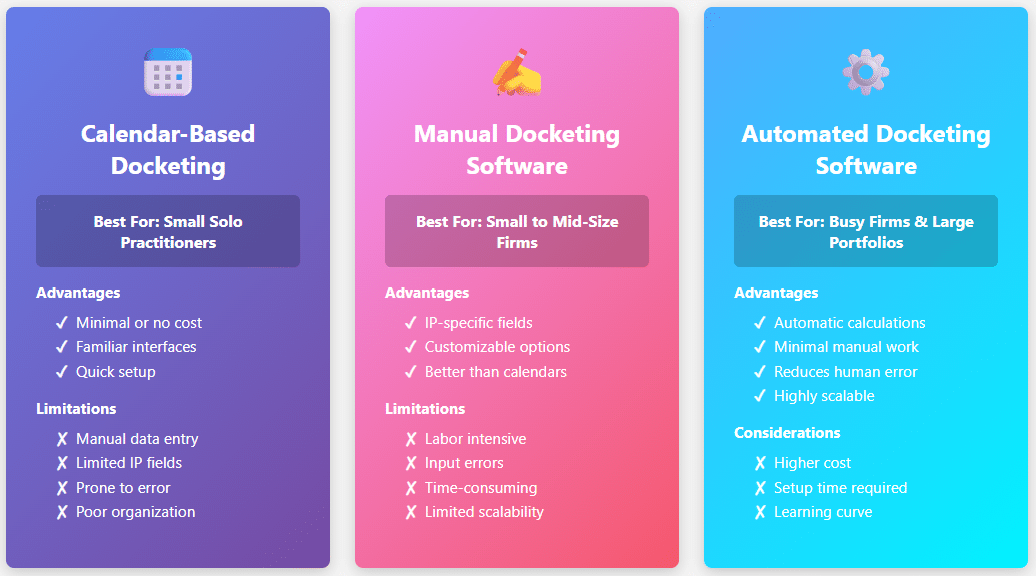
1. Calendar-Based Docketing (What is a Docketing System?)
Characteristics:
- Using standard calendar applications (Outlook, Google Calendar, etc.)
- Minimal cost or free
- Manual data entry required
- Limited IP-specific fields
Best For: Solo practitioners with very few IP matters
Limitations
- No IP-specific information fields
- Poor search and retrieval functions
- Time-consuming manual date calculations
- Prone to human error
2. Manual Docketing Software
Characteristics:
- Dedicated docketing platform
- Manual input of IP matter details
- Customizable reminders and notifications
- Basic reporting capabilities
- More IP-relevant features than generic calendars
Best For: Small to mid-size firms managing moderate caseloads
Advantages:
- Better organization than calendars
- IP-specific fields (mark name, serial number, class)
- Improved reporting and analytics
Disadvantages:
- Labor-intensive data entry
- Vulnerable to input errors
- Time-consuming deadline calculations
- Limited scalability
3. Automated Docketing Software
Characteristics:
- Intelligent deadline calculation
- Automatic data retrieval from IP offices
- Real-time status updates
- Advanced integration capabilities
- Minimal manual input required
Best For: Busy IP practices and firms managing large portfolios
Key Features:
- Integration with USPTO and global IP office databases
- Automatic deadline generation and adjustments
- Status update synchronization
- Bulk import capabilities
- Smart deadline alerts
Advantages:
- Significantly reduces human error
- Saves substantial time on data entry
- Ensures deadlines are never missed
- Scales to handle hundreds or thousands of matters
- Provides real-time portfolio visibility
Different Types of Docketing Software
E – Essential Features of Modern Docketing Systems
In this section, we will discuss about the specific essential features and benefits of the modern and advanced docketing systems.
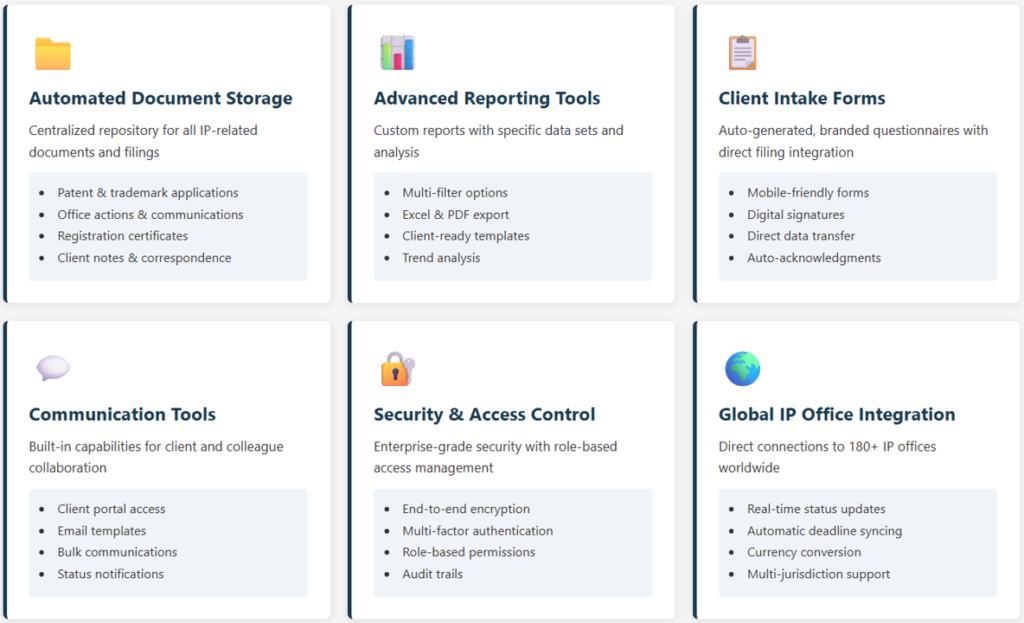
Automated Document Storage
Modern docketing systems automatically collect and organize all IP-related documents:
- Patent and trademark applications
- Office actions and communications
- Drawings, specimens, and supporting documentation
- Registration certificates and confirmations
- Client correspondence and notes
Benefit: Quick access to complete matter history without searching through file cabinets or email folders.
Advanced Reporting Tools
Capabilities Include:
- Custom report generation with specific data sets
- Multi-filter options (by attorney, client, status, jurisdiction)
- Export functionality to Excel and PDF formats
- Client-ready report templates
- Portfolio analysis and trending reports
- Deadline forecasting and planning reports
Client Intake Forms & Integration
Features:
- Auto-generated, branded intake questionnaires
- Mobile-friendly form access
- Direct data transfer to filing systems (eliminating copy-paste errors)
- Digital signature capabilities
- Automated acknowledgment notifications
Communication Tools
Built-in Capabilities:
- Client portal access with read-only viewing privileges
- Pre-populated email and letter templates
- Bulk communication capabilities
- Status update notifications
- Deadline reminder messages to stakeholders
Essential Features of Modern Docketing Systems
F – Full IP Management Systems vs. Docketing Systems
Here we will discuss about the differences between full IP management systems and the specific docketing systems.
Understanding the Difference
Docketing Systems Focus On:
- Specific upcoming deadlines
- Deadline compliance and tracking
- Immediate actions required
- Single matter view
IP Management Systems Provide:
- Comprehensive portfolio overview
- Lifecycle tracking from filing through maintenance
- Integration of multiple IP asset types
- Related matter linking
- License and contract management
- Litigation and dispute tracking
- Strategic portfolio planning
When to Use Each:
- Docketing System: Firms specializing in IP prosecution with straightforward deadline management needs
- IP Management System: Companies with diverse IP portfolios including trademarks, patents, copyrights, domains, and litigation matters requiring centralized visibility
G – Global IP Office Integrations (What is a Docketing System?)
In this section, we will talk about the functionalities of docketing systems, specifically how we can connect or integrate them with global IP office databases. In this article, we are discussing about what is a docketing System in detail.
Modern docketing systems connect with IP offices worldwide, including:
Direct Integrations:
- United States Patent and Trademark Office (USPTO)
- Canadian Intellectual Property Office (CIPO)
- European Patent Office (EPO)
- World Intellectual Property Organization (WIPO)
Multi-Office Coverage:
- 180+ global IP offices through third-party data partnerships
- Real-time status updates and official communications
- Automatic deadline calculations based on jurisdictional rules
- Currency conversion for international filing fees
H – How to Choose the Right Docketing System
This is very important and crucial question and decision, that how to choose a right docketing system for a requirement. Because, there can be multiple client types and correspondingly their different requirements.
Assess Your Practice Needs
Questions to Consider:
- How many IP matters do you manage annually?
- What types of IP do you handle? (Trademarks, patents, copyrights, combinations)
- Do you work across multiple jurisdictions?
- How many attorneys and staff need access?
- Do you need client portal access?
- What’s your budget range?
Essential Selection Criteria
Functionality
- Automated deadline calculation
- Global IP office integrations
- Advanced reporting capabilities
- Document management and storage
- Communication tools
- Mobile accessibility
User Experience
- Intuitive, modern interface
- Minimal learning curve
- Customizable dashboard views
- Mobile app availability
- Integration with existing tools
Customer Support
- Availability in your time zone
- Multiple support channels (phone, email, chat)
- Responsive support team
- Comprehensive training and onboarding
- Regular updates and feature enhancements
Pricing Model
- Transparent, predictable pricing
- No hidden fees or surprise charges
- Flexible scaling as your practice grows
- ROI alignment with time savings
- Free trial or demo access
How to Choose the Right Docketing System

I – Implementation & Integration
This section is important for implementing and integrating the docketing systems into the existing processes of different in-house departments and solo practices.
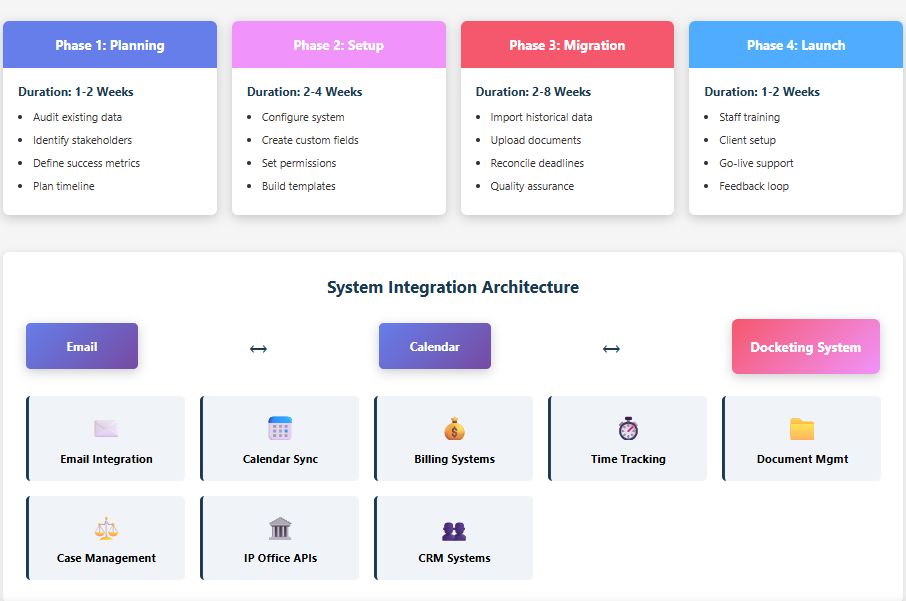
Getting Started with a New Docketing System
Phase 1: Planning (1-2 weeks)
- Audit existing matter data and document repository
- Identify key stakeholders and decision-makers
- Define success metrics and goals
- Plan migration timeline
Phase 2: Setup (2-4 weeks)
- Configure system parameters and preferences
- Create custom fields and report templates
- Set up user roles and permissions
- Establish naming conventions and organization structure
Phase 3: Migration (2-8 weeks)
- Import historical matter data
- Upload archived documents
- Reconcile existing deadlines with system calculations
- Quality assurance and verification
Phase 4: Training & Launch (1-2 weeks)
- Staff training and certification
- Client communication and portal setup
- Go-live support and monitoring
- Feedback collection and refinement
Implementation & Integration
J – Justification: Why Docketing Systems Are Non-Negotiable
This is an interesting topic, where we will discuss the importance of docketing systems. What if we do not use them, and how much they can cost us?
The True Cost of Missing IP Deadlines
Financial Consequences:
- Abandoned Applications: Loss of filing fees and months of prosecution work
- Abandoned Marks: Inability to renew existing trademark registrations
- Maintenance Fee Defaults: Lost patent protection due to unpaid fees
- Client Malpractice Claims: Potential liability for damages and lost business
- Recovery Fees: Expensive petition filings to restore abandoned applications
- Lost Revenue: Inability to enforce or license abandoned IP assets
Real-World Impact: A missed trademark renewal deadline in a single jurisdiction can result in loss of trademark protection, enabling competitors to use similar marks. Recovery requires expensive petitions and may not succeed, permanently damaging the brand.
K – Key Metrics & Reporting (What is a Docketing System?)
In this part, we will discuss about the important key metrics, parameters and reporting aspects, these can be used as efficiency checking at regular intervals.
What to Track with Your Docketing System
Portfolio Health Metrics
- Total matters by type and status
- Aging matters and historical trends
- Deadline completion rates
- Missed deadline incidents (target: zero)
Operational Metrics
- Average time to complete matters
- Attorney billable hours saved through automation
- Error reduction compared to manual systems
- Client satisfaction scores
Financial Metrics
- Cost savings through prevented missed deadlines
- Revenue generated from increased capacity
- ROI on docketing system investment
- Cost per matter tracked
L – Legal Compliance & Risk Management
In this part, we will talk about the legal compliances and risk management.
Regulatory Requirements
Ethical Obligations:
- Attorney Rules of Professional Conduct emphasize competent representation
- Maintaining systems to ensure deadline compliance is fundamental
- Documenting deadline management procedures
- Regular audits of docketing system accuracy
Malpractice Prevention:
- Maintain detailed records of all deadline tracking
- Implement dual-verification systems for critical dates
- Regular backup and disaster recovery procedures
- Audit trails showing system modifications
M – Maintenance & Ongoing Management
In this section, we will talk about the ongoing management and maintenance of the already implemented docketing system. There are many best practices for long-term success and effective management.
Best Practices for Long-Term Success
Regular Reviews
- Monthly portfolio audits
- Quarterly system performance evaluations
- Annual training refresher sessions
- Periodic process optimization reviews
System Maintenance
- Keep software updated with latest features
- Monitor data integrity and accuracy
- Perform regular backups
- Review and update user access controls
Continuous Improvement
- Gather staff feedback on system usability
- Analyze reporting data for process improvements
- Stay informed about new features and capabilities
- Benchmark against industry standards
N – New Technologies & Future Trends
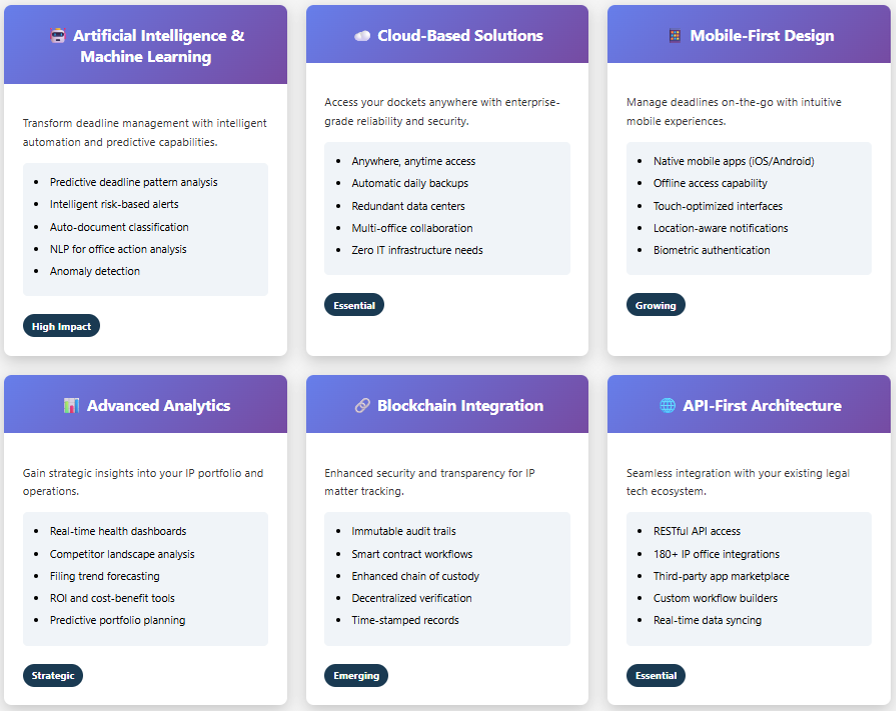
There are lot of new technology trends and advancements happening in this modern world. For example, AI, Machine learning, cloud-based systems, etc. – all are innovating everyday. In this section, we will discuss about the emerging capabilities in the docketing domain.
Emerging Capabilities
Artificial Intelligence & Machine Learning
- Predictive analytics for deadline patterns
- Intelligent deadline alerts based on risk factors
- Automated document classification
- Natural language processing for office action analysis
Cloud-Based Solutions
- Anywhere access to dockets and documents
- Automatic backup and disaster recovery
- Seamless collaboration across offices
- Reduced IT infrastructure costs
Mobile-First Design
- Native mobile applications
- Offline access capabilities
- Touch-optimized interfaces
- Location-aware notifications
Advanced Analytics
- Portfolio health dashboards
- Competitive landscape analysis
- Filing trend forecasting
- Cost-benefit analysis tools
O – Optimization Tips for Maximum Efficiency
In this section, we have curated the tips and best practices for ensuring maximum efficiency and best output performance, specifically in workflow.
Workflow Best Practices
Standardized Procedures
- Consistent naming conventions
- Uniform matter classification schemes
- Standard deadline calculation methodologies
- Approved template library
Team Coordination
- Clear role definitions and responsibilities
- Regular team synchronization meetings
- Documented escalation procedures
- Cross-training on critical functions
Client Communication
- Regular status updates
- Proactive deadline notifications
- Transparent fee calculations
- Clear deadline responsibility allocation
P – Pricing Models Explained (What is a Docketing System?)
Here we will discuss about the different models of pricing or existing costs in the industry. Mostly these are offered in subscription-based models.
Common Docketing Software Pricing (What is a Docketing System?)
Subscription-Based Models
- Monthly or annual fixed fees
- Per-user licensing
- Tiered pricing based on features
- Volume discounts for large portfolios
What to Avoid
- Hidden per-feature charges
- Unexpected upgrade costs
- Excessive data export fees
- Inflated setup and training costs
Total Cost of Ownership
- Calculate based on time savings
- Factor in risk reduction benefits
- Consider scalability for future growth
- Compare against cost of missed deadlines
Q – Quality Assurance & Accuracy
In this part, we will discuss about the quality control, reliability of systems and how can we avoid the errors or minimize the risk of errors.
Ensuring System Reliability
Data Validation Procedures
- Automated data validation rules
- Duplicate detection and prevention
- Cross-reference verification with IP offices
- Regular accuracy audits
Error Prevention
- Mandatory required fields
- Date format standardization
- Automated deadline recalculation
- Built-in conflict alerts
R – Reporting & Analytics
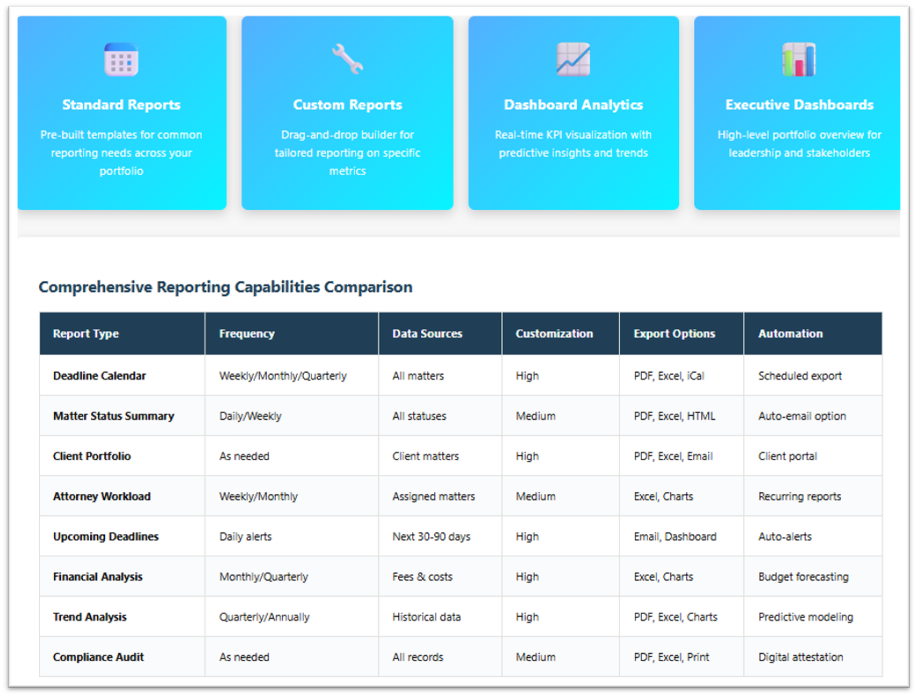
In the Reporting and Analytics, most of the docketing systems provides this feature, where user can easily see the different types of reports, as per the requirements.
Comprehensive Reporting Capabilities
Standard Reports
- Deadline calendars (weekly, monthly, quarterly)
- Matter status summary reports
- Client portfolio reports
- Attorney workload distribution
- Upcoming deadline alerts
Custom Report Builder
- Drag-and-drop report creation
- Multiple filter options
- Calculated fields for analysis
- Export and scheduling options
Dashboard Analytics
- Real-time portfolio overview
- Key performance indicators
- Trend analysis and forecasting
- Comparative metrics
S – Security & Data Protection
Security (IT, Cyber) and Data protection – these all are important aspects of a high-quality docketing systems. Users like law firms, paralegals, always need this assurance about the security and data protection aspects.
Critical Considerations
Data Security Measures
- Bank-level encryption for data in transit and at rest
- Role-based access controls
- Multi-factor authentication
- Regular security audits and compliance certifications
Compliance Standards
- GDPR compliance for European clients
- CCPA compliance for California operations
- Attorney-client privilege protection
- Industry-standard security certifications (ISO 27001, SOC 2)
Disaster Recovery
- Automated daily backups
- Redundant data centers
- Recovery time objectives (RTO)
- Business continuity planning
T – Training & Onboarding
Here in this section, we will discuss about the training and onboarding processes. For every software, there is a need for arranging the trainings to the new users. Mostly the docketing system companies, provide initial rounds of trainings to the new software users.
Essential Training Components
Initial Training
- System navigation and basic functions
- Daily workflow procedures
- Report generation and customization
- Mobile app usage
Advanced Training
- Bulk import and data migration
- Custom field configuration
- Integration with other software tools
- Advanced reporting and analytics
Ongoing Support
- Regular webinar and training sessions
- Updated documentation and tutorials
- User community forums
- Direct support access for complex issues
U – User Adoption & Change Management
In this part, we will discuss about user-experience, user adaption, and transition / change management.
Ensuring Successful Implementation
Stakeholder Communication
- Executive sponsorship and support
- Clear communication of benefits
- Realistic timeline and expectations
- Success metrics definition
Team Buy-In
- Involve users in system selection
- Highlight time-saving benefits
- Provide adequate training and support
- Celebrate early wins and improvements
Feedback Loop
- Regular check-ins with system users
- Address concerns and issues promptly
- Implement user suggestions
- Monitor adoption metrics
V – Vendor Selection & Evaluation
Vendor selection and evaluation of docketing software is an important step to consider when comparing and analysing the multiple options.
Critical Evaluation Questions
For Potential Vendors:
- How long have they been in business?
- What size firms do they serve?
- What IP offices do they integrate with?
- How frequently do they update integrations?
- What is their customer support response time?
- How do they handle data security and compliance?
- What is their pricing transparency?
- Do they offer free trial or demo access?
Reference Checks
- Request client references
- Ask about specific features you need
- Inquire about support quality and responsiveness
- Discuss ROI and time savings achieved
W – Workflow Optimization (What is a Docketing System?)
Workflow optimization is a key process to optimize and streamline the process, workflow, and overall task management.
Streamlining Your Docketing Process
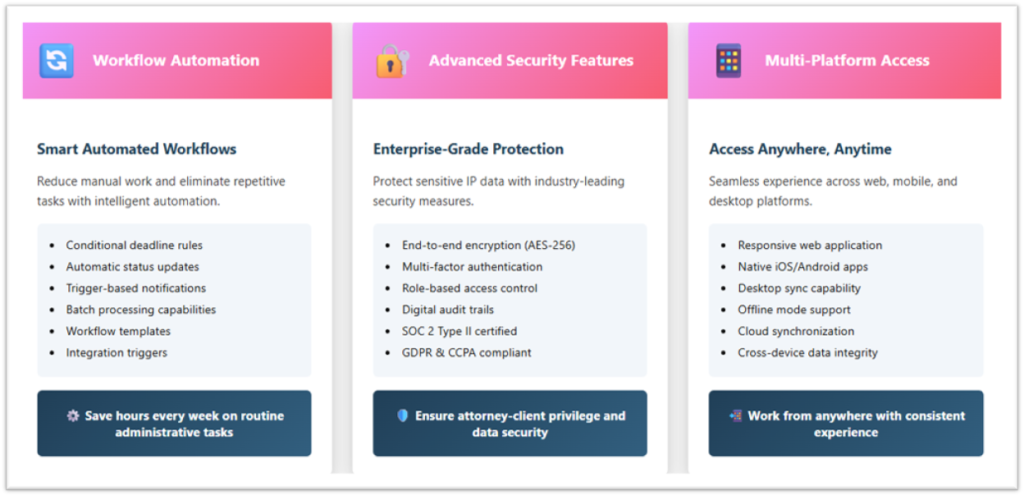
Automation Rules
- Set automatic deadline calculation rules
- Create automated status update notifications
- Implement automatic document filing
- Configure bulk communication templates
Integration Workflow
- Connect with email and calendar systems
- Link to billing and time tracking software
- Integrate with document management systems
- Synchronize with case management tools
Batch Processing
- Bulk matter import capabilities
- Mass deadline updates
- Batch client communications
- Consolidated reporting workflows
X – eXtra Features That Add Value
In this part, we will talk about the extra features which are important in every docketing system.
Advanced Capabilities to Consider
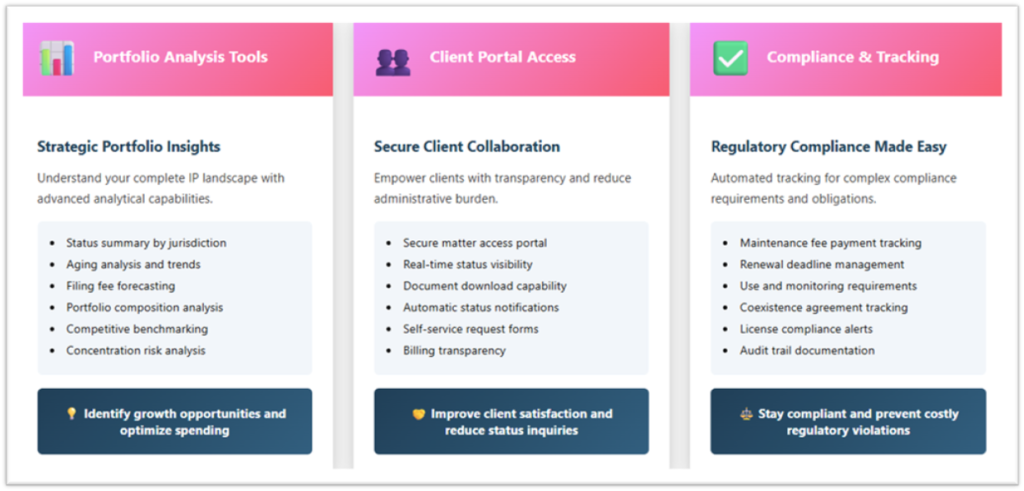
Portfolio Analysis
- Status summary by jurisdiction
- Aging analysis and trend reports
- Filing fee forecasting
- Portfolio composition analysis
Client Portals
- Secure client access to their matters
- Automatic status notifications
- Document download capabilities
- Self-service request submission
Compliance Tracking
- Maintenance fee payment tracking
- Renewal deadline management
- Use and monitoring requirements
- Coexistence agreement tracking
Y – Year-Round Planning & Maintenance
In this section, we will discuss about the year-round planning and how we can ensure the maintenance across the year.
Strategic Docketing Management
Quarterly Reviews
- Review and update procedures
- Assess system performance
- Analyze metrics and trends
- Plan improvements for next quarter
Annual Planning
- Portfolio analysis and forecasting
- Budget planning for renewals and maintenance
- Strategic IP goals and alignment
- Technology upgrades and enhancements
Ongoing Compliance
- Regular staff training refreshers
- System update implementation
- Backup and recovery testing
- Security and compliance audits
Z – Zero-Tolerance for Missed Deadlines
In this section, we will discuss about that, how can we ensure zero-tolerance against missed deadlines? because the missing deadlines can not be allowed in efficient process.
Creating a Deadline-Proof Practice
System Redundancy
- Primary deadline tracking in docketing system
- Secondary calendar backup for critical dates
- Multiple reminder notifications
- Team review procedures for high-value matters
Quality Assurance
- Supervisory review of critical deadlines
- Periodic accuracy audits
- Documented deadline management procedures
- Continuous process improvement
Cultural Commitment
- Firm-wide deadline awareness training
- Recognition of deadline compliance achievements
- Zero-tolerance policy for missed deadlines
- Regular communication of deadline importance
Our Services: Trademark Services, Docketing / IP Management Services

